Pro feature: multi-material placement
Control the distribution of multiple materials within a single texture. This allows for complex blending from natural stone variation to specific geometric motifs.
Placement priority
When using multiple materials, the editor resolves their positions based on a strict hierarchy. If two materials are assigned to the same tile, the higher-priority method wins:
- Manual: highest priority, overrides all other settings
- Defined: Mid priority, overrides random placement
- Random: Lowest priority, fills the remaining available tiles
Placement methods
Random
Tiles are distributed stochastically based on a percentage. The default material automatically fills any remaining space not claimed by secondary materials.
- Frequency input: set a percentage to determine the coverage
- Stacking logic: if material A is 33% amd Material B is 33%, each will occupy roughly one-third of the total area, with the base material filling the final third.
Defined
Use “hit and miss” logic to create repetitive, rule-based sequences. This is ideal for patterns that must remain consistent even if you change the total number of rows and columns.
- Hit: the number of consecutive tiles that will use this material.
- Miss: the number of consecutive tiles to skip before starting the next “hit”.
- Shift: adjust the starting point of the sequence to offset the pattern.
Manual
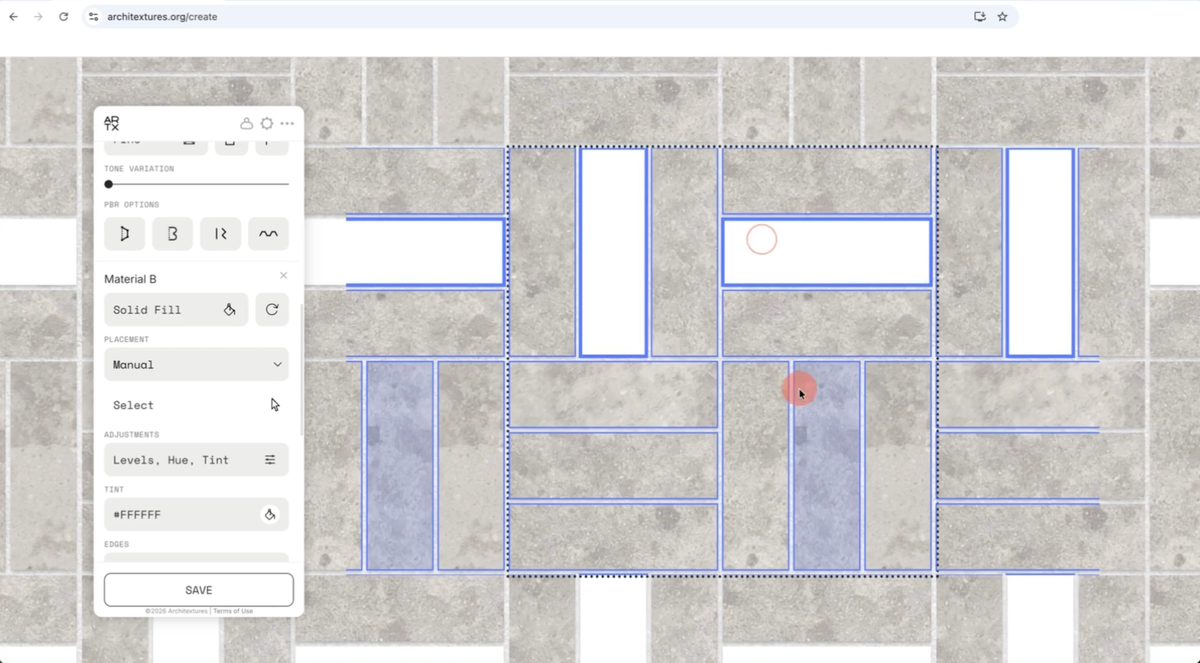
For total control, use the manual selector to designate exactly which tiles should use a specific material.
- Select Manual from the placement dropdown.
- The viewport will display a blue outline over the pattern.
- Click individual tiles to apply the material. Click and drag to select larger areas.